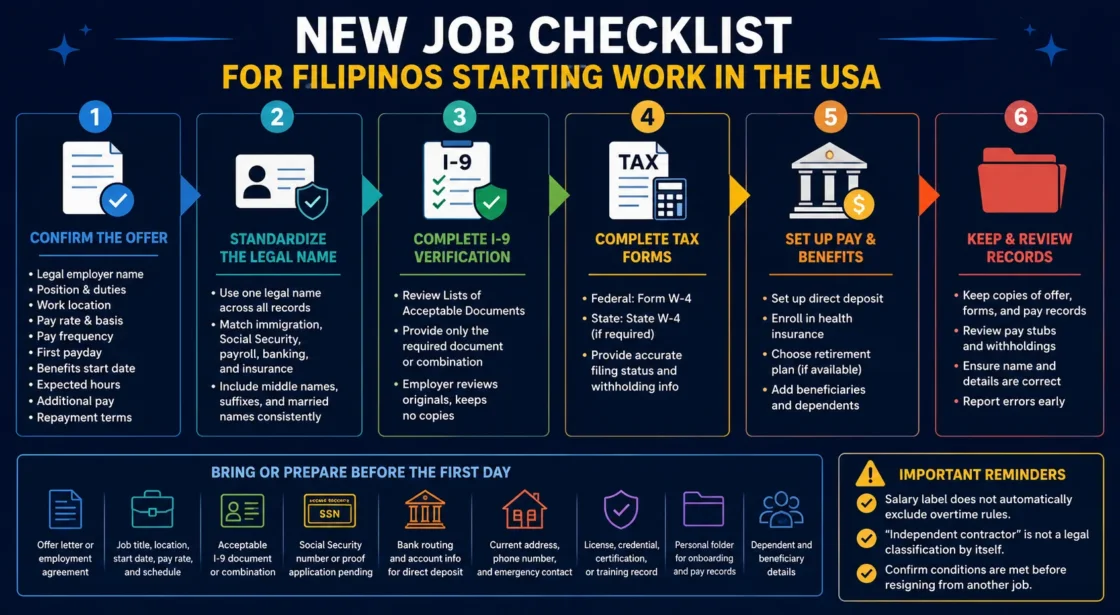
Starting a new job in the United States involves more than arriving for orientation and learning a new role. Before the first paycheck is issued, a new employee may need to confirm the legal employer name, present acceptable Form I-9 documents, complete federal and state tax forms, choose a payment method, enroll in benefits, and make sure the same legal name appears across immigration, Social Security, payroll, banking, and insurance records. For Filipinos, special attention to middle names, maternal surnames, married names, compound given names, and suffixes can prevent payroll and wage-reporting problems that are difficult to correct later.
Why this matters →
A careful first-week setup helps ensure that wages are reported under the correct name, taxes are withheld under the right rules, benefits begin as expected, and the first paycheck matches the written job offer.
Bring or Prepare Before the First Day:
- The written offer letter or employment agreement
- The confirmed job title, work location, start date, pay rate, and expected schedule
- Acceptable Form I-9 document or document combination chosen by the employee
- Social Security number, or proof that an application is pending when applicable
- Bank routing and account information for direct deposit
- Current home address, phone number, and emergency contact
- Dependent and beneficiary details for benefit enrollment
- Professional license, credential, training record, or certification required for the position
- A personal folder for copies of onboarding forms, pay records, and benefit confirmations
Tip: Do not hand over every identity or immigration document available. Review the Form I-9 Lists of Acceptable Documents and choose only the document or permitted combination needed for verification.
Step 1: Confirm the Offer Before Work Begins
The written offer should identify who is hiring, what work will be performed, and how compensation will be calculated.
The name used in conversation with a recruiter may not be the legal employer that appears on the paycheck. Staffing arrangements can involve an agency, a client company, a franchise operator, a private household, or a separate payroll company. The employee should know which organization is responsible for wages, time records, benefits, and workplace complaints.
Details That Should Be in Writing
- Legal employer name: The company or person responsible for issuing wages and tax records.
- Position and duties: The title should match the actual work, especially when a license limits which duties may be performed.
- Work location: Confirm whether the position is on-site, hybrid, remote, mobile, or assigned through a staffing agency.
- Pay basis: Hourly wage, annual salary, daily rate, commission, piece rate, or another method.
- Pay frequency: Weekly, every two weeks, twice monthly, or another schedule.
- First payday: A first paycheck may cover only part of the first month if the employee starts after a payroll cutoff.
- Employment category: Full-time, part-time, temporary, seasonal, per diem, on-call, or contract.
- Expected hours: Normal shift, weekend duty, night work, mandatory overtime, or an on-call requirement.
- Additional pay: Shift differential, holiday premium, commission, bonus, tips, mileage, or travel reimbursement.
- Benefits date: When medical coverage, paid leave, or retirement participation becomes available.
- Repayment terms: Conditions attached to a signing bonus, relocation payment, training program, equipment, or employer-funded credential.
Important Warning: A salary label does not automatically mean that a worker is excluded from overtime rules. A document calling someone an “independent contractor” also does not decide the legal classification by itself. Federal analysis looks at the actual working relationship, including control, economic dependence, investment, permanence, and the worker’s opportunity for profit or loss.[g]
Do Not Resign From Another Job Too Early
A start date may still depend on a background check, drug screening, professional license, credentialing decision, reference verification, immigration-related approval, client assignment, or medical clearance. Before leaving an existing position, confirm whether the offer is final or conditional and which conditions remain open.
Step 2: Standardize the Legal Name Across Every Record
Filipino naming patterns can be entered differently by U.S. payroll, banking, insurance, and human resources systems.
A Philippine passport may show two given names, a maternal surname as the middle name, a married surname, or a suffix such as Jr., Sr., II, or III. U.S. systems may split or shorten these fields. A familiar name or nickname can be used for a badge or email address, but official employment records should follow the legal name connected to Social Security and identity documents.
Records to Compare
| Record | Name to Review | Reason for Checking |
|---|---|---|
| Passport or immigration document | Legal name printed on the document | Used to establish identity and, when applicable, work authorization |
| Social Security record | Exact name associated with the SSN | Used for wage reporting and the employee’s earnings history |
| Form I-9 | Current legal name, with other last names entered where requested | Connects the employee’s identity to employment eligibility verification |
| Payroll profile | Name intended for wage and tax reporting | Affects pay statements and Form W-2 |
| Bank account | Account holder name | Helps prevent a direct-deposit rejection or review |
| Benefit enrollment | Employee, dependent, and beneficiary names | Helps claims, coverage, and beneficiary records match supporting documents |
Common Filipino Name Issues
- A two-part given name is split between the first-name and middle-name fields.
- The Philippine middle name is treated as a second last name.
- A married employee’s maiden surname remains on the Social Security record while payroll uses the married surname.
- A hyphen, space, apostrophe, or suffix is removed by one system but retained by another.
- A nickname is entered into payroll because it appeared on the job application.
- The order shown on a foreign document is copied into a U.S. form without checking the field labels.
Name Mismatch Procedure: Identify which record differs, notify HR or payroll in writing, provide only the document needed to support the correction, and keep the correction confirmation. A name-and-SSN mismatch does not by itself establish an immigration problem and should not be used alone as a reason for punitive action.[d]
Step 3: Complete Form I-9 With the Correct Documents
Form I-9 verifies identity and authorization to work; it is not an application for a visa, green card, or Social Security number.
An employee generally completes and signs Section 1 no later than the first day of employment for pay. The employer or authorized representative generally completes Section 2 within three business days after that first day. A person hired for fewer than three business days must present documentation no later than the first day.[a]
Choose One Allowed Document Route
- List A: One acceptable document that establishes both identity and employment authorization; or
- List B plus List C: One acceptable identity document from List B and one acceptable employment-authorization document from List C.
The employee chooses which acceptable documents to present. An employer should not demand a green card, foreign passport, Employment Authorization Document, Social Security card, or any other specific document because of citizenship, immigration status, birthplace, appearance, surname, or accent. Employers also should not request more documents than the form requires or reject documents that reasonably appear genuine and relate to the employee.[b]
Do Not Sign Too Early: Form I-9 may be completed after the employee has accepted a job offer, but it should not be used to screen applicants before an offer. Never sign a blank form, leave identity fields for another person to complete, or present a borrowed, altered, or false document.
When a Document Has an Expiration Date
Some employment-authorization documents may require later reverification, while others do not. Ask HR which document expiration date is being tracked and what the employer expects before that date. Do not assume that an expiring document always means employment authorization ends on the same date; extensions and special rules may apply to certain document categories. The current USCIS instructions should be checked for the exact document involved.
Step 4: Handle a Delayed Social Security Number Correctly
A Social Security number is used for wage reporting, but it does not create employment authorization.
A foreign worker who is already authorized to work may work while an SSN application is being processed. Social Security instructs employers to gather the available identifying information, follow wage-reporting procedures, and update the record when the number and exact card name are received.[c]
What to Give HR or Payroll
- Full legal name as used in the SSN application
- Current address
- Date and place of birth
- Date the SSN application was submitted
- Application receipt or acknowledgement, when available
- The new SSN and exact card name as soon as the card is issued
Tip: An employee ID, USCIS number, Alien Registration Number, passport number, and SSN are different identifiers. Enter each number only in the field that specifically requests it.
Protect the Number
Provide the SSN through the employer’s secure onboarding or payroll method. Do not send the number in an open group chat, share a photograph of the Social Security card through an informal messaging account, or give HR a bank password, debit-card PIN, or one-time verification code.
Step 5: Complete Form W-4 Based on the Employee’s Own Tax Situation
Form W-4 tells payroll how to calculate federal income tax withholding from wages.
The form asks about filing status, multiple jobs, dependents, other income, deductions, and any additional amount the employee wants withheld. Copying a coworker’s answers can produce the wrong withholding because household income, tax residency, dependents, and other jobs differ from one employee to another.[e]
Questions to Answer Before Submitting the Form
- Will the employee hold more than one job at the same time?
- Does a spouse also work in the United States?
- Will the employee file jointly, separately, or under another permitted filing status?
- Does the employee expect self-employment, interest, investment, rental, or other income?
- Is the employee legally eligible to claim a child or another dependent?
- Did employment begin partway through the year?
- Has a major change occurred since the last W-4, such as marriage, divorce, a second job, or a new child?
Family Support in the Philippines Is Not the Same as a Tax Dependent
Sending money to parents, siblings, children, or other relatives in the Philippines does not automatically make that person a dependent for U.S. tax purposes. Dependency rules consider relationship, residency or citizenship conditions, support, income, and other tests. The W-4 should not be changed solely because an employee regularly sends remittances.
Tax Residency Requires Separate Attention
Immigration status and federal tax residency are related in some situations but are not identical. A noncitizen is generally treated as a resident for federal tax purposes when the green card test or substantial presence test is met, subject to exceptions and elections.[f]
Employees who remain nonresident aliens may have special Form W-4 instructions and should not assume that the standard instructions used by resident employees apply.[l]
Tax Status Warning: Do not choose “nonresident alien” or a filing status based only on nationality, visa label, marital status, or the fact that a spouse lives abroad. When the answer is uncertain, use the current IRS rules or obtain help from a qualified tax professional familiar with resident and nonresident alien taxation.
Step 6: Review State and Local Withholding
Federal Form W-4 does not replace a separate state or local withholding form.
The employee may need an additional form based on the state where the work is performed, the state of residence, or both. City, county, or other local taxes may also appear on a pay statement. Remote employees should confirm that payroll has recorded the correct home and work locations.
Address Changes That Should Be Reported
- Moving to a different state
- Changing the primary work location
- Beginning remote work from another state
- Changing the mailing address for year-end tax forms
- Moving before Form W-2 is issued
When an address changes, update HR, payroll, the benefit plan, and any retirement account separately if the employer’s system does not synchronize them. A mailing address change does not always update tax withholding automatically.
Step 7: Set Up Direct Deposit Without Exposing the Bank Account
The payroll form needs account information, not access to the employee’s online banking profile.
Information Commonly Requested
- Bank or credit union name
- Routing number
- Checking or savings selection
- Account number
- Account holder name
- A voided check, bank letter, or secure digital verification when required
The number printed on a debit card is usually not the bank account number. Confirm the routing and account numbers through the bank’s official app, statement, check, or customer service channel. Review the account holder name against the payroll name, especially after marriage or a recent Social Security name update.
If a Payroll Card Is Offered
An employer cannot require an employee to receive wages only on the employer’s payroll card. At least one alternative must be available, and the employee should review ATM, statement, balance-inquiry, replacement-card, and purchase fees before choosing the card.[j]
Payment Security Warning: HR or payroll does not need an online-banking password, debit-card PIN, or one-time security code to establish direct deposit. Treat any request to deposit a check and send part of the money elsewhere, buy gift cards, or pay for company equipment through a personal account as a reason to stop and verify the employer through an independent contact method.
Step 8: Confirm W-2 Employee or Independent Contractor Treatment
The tax form received at year-end should reflect the real working relationship, not merely the label in an agreement.
| Issue | W-2 Employee | Independent Contractor |
|---|---|---|
| Federal tax withholding | Usually handled through payroll based on Form W-4 | Usually managed by the worker, including estimated payments when required |
| Payroll record | Receives pay statements and generally Form W-2 | Keeps business payment records and may receive an information return such as Form 1099-NEC |
| Work control | Employer often directs schedule, procedures, supervision, and performance | Operates an independent business and makes business decisions |
| Business expenses | Many work tools or costs are supplied or controlled by the employer | May make business investments and bear a real opportunity for profit or loss |
| Federal wage protections | May receive minimum-wage and overtime protections when covered and nonexempt | Not covered as an employee under the FLSA |
Signs the Classification Deserves Review
- The company fixes the schedule and closely directs how every task is performed.
- The work is a regular part of the company’s business rather than a separate service offered to the public.
- The worker has no meaningful ability to negotiate rates, hire help, advertise services, or gain other clients.
- The relationship is expected to continue indefinitely.
- The company provides the central tools, systems, customers, uniform, and worksite.
- The worker receives a 1099 but functions in the same way as employees doing the same work.
No single fact decides classification. State tests can also differ from the federal test, so a worker with doubts should review both federal and state rules.
Step 9: Learn the Timekeeping Rules Before the First Shift
Hourly and other nonexempt employees need to know which activities must be recorded as work time.
Federal rules generally treat time as work when an employee is required to be on duty, on the employer’s premises, or at another prescribed workplace. Covered nonexempt employees generally must receive overtime pay for hours over 40 in a workweek, although state rules may provide additional protections.[h]
Questions to Ask
- Where and how should the employee clock in and out?
- Is orientation or required training entered automatically?
- How are missed punches corrected?
- Is a meal period automatically deducted?
- How should interrupted meal periods be reported?
- Does required preparation before a shift count as recorded time?
- How are travel between job sites, after-hours calls, or required messages recorded?
- Who approves overtime, schedule extensions, and shift changes?
- Where are night, weekend, holiday, or on-call premiums shown?
Keep a Personal Time Record: Note the date, scheduled shift, actual start and end times, meal period, extra duties, approved schedule changes, and total hours. This record should not contain patient, customer, resident, or employer-confidential information.
When Overtime Needs Approval
An employer may require advance approval before overtime is worked and may address a policy violation. That policy does not make recorded work disappear. Employees should report all hours actually worked and should not be asked to work before clocking in, continue after clocking out, or remove hours to stay within a budget.
Step 10: Select Benefits Before the Employer’s Deadline
Benefit choices affect take-home pay, medical costs, retirement savings, and family coverage.
Employers set enrollment windows and coverage dates within the rules that apply to their plans. Compare plan documents before enrolling and save the confirmation. The U.S. Department of Labor directs new workers to compare employer health and retirement options before making elections.[i]
Health Plan Details to Compare
- Employee-only, employee-plus-spouse, employee-plus-children, and family premiums
- Coverage effective date and any waiting period
- Deductible
- Copayments and coinsurance
- Out-of-pocket maximum
- Provider network
- Prescription coverage
- Emergency and out-of-area care
- Dental and vision options
- Health Savings Account or Flexible Spending Account eligibility
When Family Members Live in the Philippines
Do not assume that a U.S. employer plan will provide routine coverage in the Philippines. Ask whether a spouse or child living abroad can be enrolled, whether the plan covers only emergencies outside the United States, and what documents are required to establish the relationship. Health-plan dependent eligibility and federal tax-dependent status are separate questions.
Retirement and Beneficiary Choices
- Employee contribution percentage
- Employer matching formula
- When employer contributions become vested
- Investment selection or default option
- Beneficiary’s full legal name, date of birth, relationship, address, and contact information
- Whether a beneficiary living outside the United States may need additional identity or tax documentation later
Tip: Save a copy of the submitted election and the confirmation page. A payroll deduction alone does not show which coverage option, dependent, or beneficiary was selected.
Step 11: Read Policies That Affect Pay and Attendance
Important wage and job-status rules may appear in the handbook rather than the offer letter.
Policies to Locate
- Attendance points and call-out procedure
- No-call/no-show rule
- Probationary or introductory period
- Paid time off accrual and carryover
- Sick leave request method
- Holiday eligibility
- Shift cancellation and reporting pay
- On-call and standby requirements
- Expense and mileage reimbursement
- Uniform, parking, meal, housing, or equipment deductions
- Performance review process
- Workplace injury reporting
- Confidentiality and data-security duties
- Social-media and personal-device rules
- Outside employment or second-job restrictions
- Arbitration, repayment, non-solicitation, or restrictive-covenant terms
Documents That Should Not Be Signed Without Review
- A blank or incomplete form
- A time record that does not show the hours actually worked
- A receipt saying wages were paid before payment was received
- An authorization for an unexplained payroll deduction
- A resignation letter prepared in advance
- A repayment agreement without the amount, trigger, and calculation method
- A document the employee does not understand and is not allowed to read or copy
Step 12: Protect Passports, Work Documents, and Recruitment Records
The employer may inspect documents required for onboarding, but the employee should keep control of original personal documents.
Do not leave an original passport, Social Security card, Permanent Resident Card, Employment Authorization Document, or other identity document with a recruiter, supervisor, landlord, or staffing coordinator for storage. When an original must be inspected, ask when it will be returned. Use a secure method for any permitted copy and keep a record of what was provided.
Keep These Recruitment and Placement Records
- Job advertisement
- Recruiter name and company
- Offer letter and signed agreement
- Messages describing pay, location, housing, transportation, duties, or immigration support
- Receipts for any fee or travel payment
- Housing or transportation agreement
- Payroll deductions connected to recruitment, travel, training, or placement
- Copies of credentialing and licensing promises
Stop and Verify: Seek independent help when the real employer, worksite, wage, or duties differ materially from the offer; an original passport is withheld; a worker is threatened because of immigration status; a large unexplained debt is tied to the job; or the employee is told that leaving the job is never permitted. Keep communications and payment records in a private location that the employer cannot access.
Step 13: Know How National-Origin and Accent Rules Apply
Filipino employees should be evaluated on job-related qualifications and performance rather than stereotypes about nationality, accent, or ethnicity.
Federal protections can apply to hiring, firing, pay, assignments, promotions, training, benefits, and other employment conditions. National-origin discrimination may involve unfavorable treatment because a worker is Filipino, comes from a particular region, has a Filipino name or accent, or is associated with someone of a particular national origin. It can also occur between people of the same national origin.[k]
Situations Worth Documenting
- Lower pay or fewer hours linked to being Filipino or foreign-born
- Mocking or repeated comments about a Filipino accent, name, food, ethnicity, or background
- A demand to use a different name because customers do not want to pronounce the legal name
- Assignment of extra translation duties without considering workload or compensation
- A rule applied only to workers who speak Tagalog or another Philippine language
- Different job duties based on a stereotype that Filipinos are naturally suited to caregiving, nursing, hospitality, or service work
- Threats involving immigration status after a wage or workplace complaint
- A reduction in hours, demotion, or termination following a discrimination report
Record Facts, Not Only Impressions
- Date, time, and location
- Exact words or conduct
- Names of people involved
- Witnesses
- Comparable treatment of other employees
- Copies of schedules, pay records, messages, warnings, or evaluations
- The report made to a manager or HR
- The employer’s response
- Any later change in pay, hours, assignments, or treatment
Step 14: Verify Licenses and Foreign Credentials Before Performing Restricted Duties
A Philippine degree, board examination, or professional license may support an application but does not automatically authorize regulated work in a U.S. state.
This issue is especially relevant to nurses, physical therapists, teachers, engineers, accountants, medical technologists, commercial drivers, cosmetologists, and other licensed occupations. The exact requirements depend on the profession and state.
Items to Confirm
- Credential evaluation status
- State license or permit number
- License status and expiration date
- Approved professional title
- Duties allowed under the current credential
- Required supervising professional
- Background check or fingerprint clearance
- Health, vaccination, drug-screening, CPR, safety, or facility requirements
- Continuing education obligations
- Who pays renewal, examination, credentialing, and training costs
Practice Limit Warning: Do not perform a duty that requires an active license, permit, supervision arrangement, or facility authorization until the applicable status has been confirmed. A recruiter’s verbal statement that paperwork will be completed later may not protect the employee from licensing consequences.
Step 15: Build a Private Employment Records Folder
Access to an employer portal may end immediately after a resignation, termination, assignment change, or system update.
Identity and Onboarding
- Offer letter and job description
- Form I-9 receipt or related notice when applicable
- W-4 submission confirmation
- State and local withholding forms
- Direct-deposit confirmation
- Employee handbook acknowledgement
- License and credential records
Pay and Time
- Pay statements
- Personal time records
- Approved schedule changes
- Overtime approvals
- Bonus or commission terms
- Expense and mileage submissions
- Payroll correction requests
Benefits and Leave
- Health-plan election
- Coverage effective date
- Dependent enrollment confirmation
- Beneficiary designation
- Retirement contribution election
- Paid-leave balance
- Leave requests and responses
Store personal records outside the employer’s email account and device. Do not copy confidential employer information or any patient, resident, client, customer, student, or coworker data into the folder.
Step 16: Audit the First Paycheck Line by Line
The first pay statement tests whether the offer, timekeeping, tax, banking, and benefit records were entered correctly.
| Pay Statement Item | What to Compare |
|---|---|
| Employee name | Payroll profile and Social Security record |
| Employer name | Offer letter and the entity responsible for wages |
| Home address | Current residence and tax-location records |
| Pay period | Dates actually included in the payment |
| Pay rate | Written hourly wage, salary, shift rate, or commission terms |
| Regular hours | Personal time record and approved schedule |
| Overtime hours | Hours over the applicable threshold and the listed overtime rate |
| Premiums | Night, weekend, holiday, on-call, or shift-differential terms |
| Gross pay | Pay rate, hours, bonuses, commissions, and premiums |
| Federal withholding | W-4 choices and any special nonresident instructions |
| State and local withholding | Recorded home and work locations |
| Social Security and Medicare | Tax treatment applicable to the employee |
| Benefit deductions | Coverage selected and stated employee premium |
| Retirement contribution | Selected percentage or amount |
| Other deductions | Written authorization and clear description |
| Net pay | Amount deposited, placed on a payroll card, or issued by check |
Frequent First-Paycheck Errors
- Orientation or training hours are missing.
- The first days fall outside the pay period and are misunderstood as unpaid.
- The wrong hourly rate is used.
- Overtime is entered as regular time.
- A night or weekend differential is missing.
- The wrong state or city tax is withheld.
- A benefit deduction begins before the stated coverage date.
- A retirement percentage differs from the submitted election.
- A deduction appears twice.
- Direct deposit is sent to an old or incorrect account.
- The pay statement uses a name that differs from the Social Security record.
- A housing, uniform, meal, equipment, or placement deduction was not explained in advance.
How to Report a Payroll Error
- Identify the pay date and pay period.
- Name the exact line that appears incorrect.
- State the amount or hours shown.
- State the amount or hours expected.
- Attach the relevant schedule, time record, offer term, or benefit confirmation.
- Ask when and how the correction will be made.
- Keep the request and response outside the employer portal when permitted.
Example Payroll Message: “The pay statement dated [date] shows [number] regular hours for the period [dates]. The approved time record shows [number] hours, including [number] overtime hours. Please review the attached record and confirm the correction date.”
Step 17: Recheck the Setup After 30 Days
A second review can catch delayed benefit, payroll, classification, and licensing problems.
Employment and Pay
- The actual duties match the offered position.
- The employer and staffing arrangement are understood.
- W-2 or contractor treatment matches the real working relationship.
- All regular, overtime, training, and premium hours have been paid.
- No unexplained deduction appears.
- Pay statements are stored privately.
Tax and Identity Records
- The legal name is consistent across Social Security, payroll, banking, and benefits.
- The SSN has been added to payroll if it was pending.
- The W-4 still reflects the household and job situation.
- State and local withholding match the home and work locations.
- The mailing address is current.
Benefits and Credentials
- Health coverage is active on the promised date.
- Employee and dependent names are correct.
- Insurance cards or digital access are available.
- The retirement contribution began as selected.
- The beneficiary confirmation is saved.
- Required licenses, facility privileges, and certifications remain active.
Additional Checks by Type of Work
Some onboarding risks depend on the worksite, pay method, scheduling system, and licensing rules.
Healthcare Workers
- Confirm state license, credentialing, facility privileges, and approved job title.
- Check whether orientation, chart training, and mandatory modules are paid.
- Review night, weekend, preceptor, charge, on-call, and callback pay.
- Know how missed meal periods and late charting are recorded.
- Confirm which organization pays agency or travel staff.
Caregivers and Domestic Workers
- Record the legal employer name and exact work address.
- Define live-in or live-out status, sleeping time, overnight interruptions, and on-call expectations.
- Review meal, housing, transportation, and supply deductions.
- Keep control of the passport and other original documents.
- Maintain a personal record of daily start, end, and interrupted rest times.
Restaurant and Hospitality Workers
- Ask how tips, tip pools, service charges, and cash shortages are handled.
- Record opening, closing, cleaning, side-work, and required meeting time.
- Review uniform, meal, breakage, and walkout deductions.
- Confirm whether training shifts and trial shifts are paid.
- Check how holiday and late-night premiums appear on the pay statement.
Office and Remote Workers
- Confirm which state is recorded as the work location.
- Review home-office equipment ownership and return terms.
- Ask how after-hours messages, required calls, and time-zone differences are handled.
- Understand monitoring, data-security, confidentiality, and personal-device rules.
- Keep copies of expense approvals and equipment receipts.
Temporary and Staffing Agency Workers
- Identify the agency, client company, supervisor, and payroll contact.
- Know who approves hours and workplace injuries.
- Confirm the assignment rate, end date, schedule, location, and conversion terms.
- Review transportation, housing, equipment, and placement deductions.
- Ask what happens to benefits and accrued leave between assignments.
New-Job Checklist to Keep With Employment Records
Use the list until identity, payroll, tax, benefits, and workplace records have all been confirmed.
Before the First Day:
- Written offer received and conditional items identified
- Legal employer, worksite, supervisor, and payroll contact confirmed
- Pay rate, schedule, overtime status, premiums, and first payday reviewed
- Worker classification reviewed
- Legal name compared across identity and Social Security records
- Employee-selected Form I-9 documents prepared
- Bank information verified through a secure source
- Required license or credential confirmed
During Onboarding:
- Form I-9 employee section completed on time
- Form W-4 completed for the employee’s own tax situation
- State or local withholding forms completed when required
- SSN application status given to payroll when the number is pending
- Direct deposit or another payment method chosen securely
- Timekeeping system tested
- Handbook, attendance rules, and injury-reporting process received
- Copies or confirmations stored privately
Before Benefits Enrollment Closes:
- Health-plan premium and out-of-pocket costs compared
- Coverage date and waiting period confirmed
- Dependents and overseas-coverage limits reviewed
- Retirement contribution and employer match reviewed
- Beneficiary details checked and confirmation saved
After the First Paycheck:
- Name, address, employer, pay period, and rate checked
- Regular, overtime, training, and premium hours compared
- Federal, state, and local withholding reviewed
- Benefits, retirement, and other deductions verified
- Net pay matched to the deposit, card, or check
- Any error reported in writing with supporting records
Verification Note: Employment, tax, immigration-document, wage, benefit, licensing, and state-law rules can change and may differ by location or worker category. Confirm any deadline, form instruction, work-authorization issue, tax status, payroll dispute, or professional requirement through the responsible federal or state agency and the current employer plan documents.
Sources
- USCIS, Instructions for Form I-9 — Explains employee and employer completion timing, document presentation, and special timing for employment lasting fewer than three business days. (Reliable because USCIS administers Form I-9.)
- U.S. Department of Justice, Immigrant and Employee Rights FAQs — Explains unfair documentary practices, including demands for specific, extra, or different Form I-9 documents. (Reliable because the department enforces the related federal anti-discrimination provision.)
- Social Security Administration, Employer Responsibilities When Hiring Foreign Workers — Covers work while an SSN application is pending and later wage-record updates. (Reliable because SSA issues Social Security numbers and maintains earnings records.)
- Social Security Administration, Restrictions on Using SSN Verification — States that a name-and-SSN mismatch alone does not establish immigration status and should not be used for punitive action. (Reliable because SSA operates the verification service.)
- Internal Revenue Service, Your First Job — Describes Form W-4, paycheck withholding, and common taxes deducted from wages. (Reliable because the IRS administers federal tax withholding.)
- Internal Revenue Service, Determining an Individual’s Tax Residency Status — Explains the green card and substantial presence tests and the distinction between resident and nonresident tax treatment. (Reliable because the IRS administers federal tax residency rules.)
- U.S. Department of Labor, Employee or Independent Contractor Classification — Describes the economic-reality analysis and why a contract label or Form 1099 does not decide status alone. (Reliable because the Wage and Hour Division administers federal wage guidance.)
- U.S. Department of Labor, Hours Worked Under the FLSA — Explains compensable time and the general federal overtime rule for covered nonexempt employees. (Reliable because the Wage and Hour Division enforces the FLSA.)
- U.S. Department of Labor, Workers and Families Benefit Resources — Provides official material on comparing health and retirement options when starting a job. (Reliable because EBSA oversees many private-sector job-based benefit protections.)
- Consumer Financial Protection Bureau, Payroll Card Choice — Explains that an employer must provide an alternative to receiving wages only on a payroll card and discusses possible fees. (Reliable because the CFPB administers federal consumer-finance protections.)
- U.S. Equal Employment Opportunity Commission, National Origin Discrimination — Covers discrimination involving nationality, ethnicity, accent, pay, assignments, harassment, and other employment terms. (Reliable because the EEOC enforces federal workplace discrimination laws.)
- Internal Revenue Service, Wage Withholding for Foreign Workers — Explains special Form W-4 instructions and withholding treatment for nonresident alien employees. (Reliable because the IRS administers federal wage-withholding rules.)