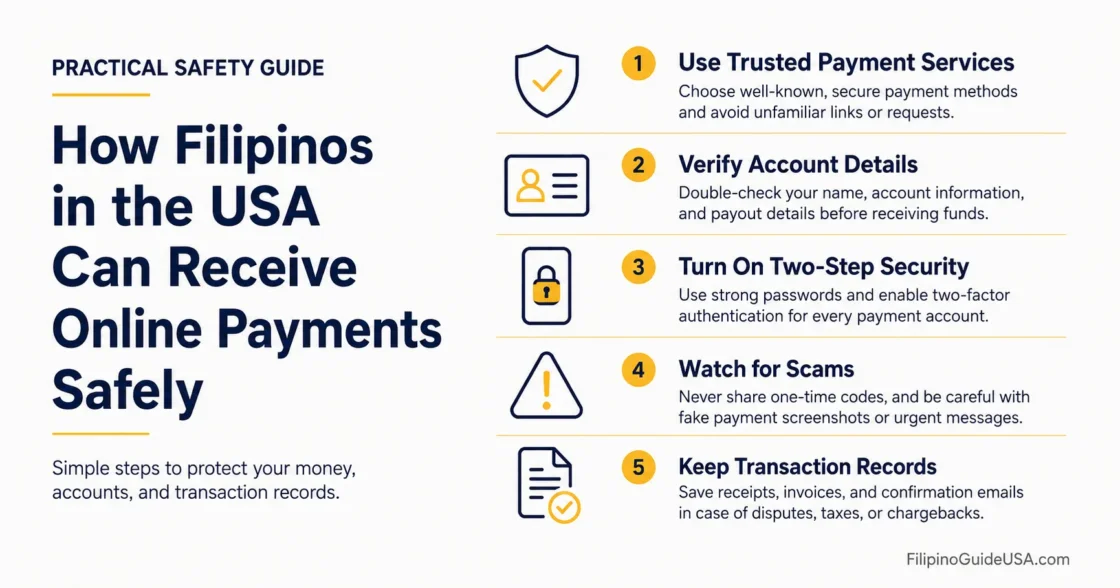
Receiving online payments in the United States can be simple, but Filipino workers, sellers, students, new immigrants, and community organizers need to separate convenience from safety. The safest approach is to use trusted payment tools, move money into an insured account, keep clear records, and avoid treating casual payment apps as a substitute for tax, work authorization, or banking rules.
Why this matters →
Filipino households in the USA often manage freelance work, marketplace sales, family reimbursements, and community payments across more than one app, so small payment mistakes can create tax confusion, fraud risk, or account freezes.
Before You Accept Payments: Prepare a U.S. bank or credit union account, a verified payment app profile, a secure email address, a phone number you control, a tax identification number when required, and a simple recordkeeping file for invoices, screenshots, receipts, refunds, and fees.
Choose the Right Payment Setup
Different payment types need different safety steps, especially when personal reimbursements and work income use the same phone.
Filipinos in the USA often receive payments for very different reasons: a roommate paying back rent, a kababayan reimbursing food costs after a community event, a client paying for design work, or a buyer paying for a used item. The first safety rule is to label the purpose correctly and avoid mixing personal and business payments in the same flow.
| Payment Situation | Safer Setup | Main Risk to Watch |
|---|---|---|
| Family gifts or reimbursements | Use personal payment notes such as “rent share,” “meal reimbursement,” or “family gift” when the app allows it. | A personal transfer may be mistaken for business income if records are unclear. |
| Freelance or side work | Use invoices, a business profile when suitable, and a separate tracking sheet for gross income, fees, and refunds. | Tax forms may not match personal records if payments are not tracked. |
| Marketplace sales | Keep item descriptions, buyer messages, shipping proof, sale price, original cost, and refund notes. | Chargebacks, fake payment screenshots, or tax confusion on personal items sold at a gain. |
| Regular business payments | Use a business bank account or dedicated account path, written payment terms, and a clear refund policy. | Account reviews, payment holds, mismatched names, and unclear customer disputes. |
Tip: A payment note should explain the real purpose of the transfer in plain words. Do not use joke descriptions, vague labels, or misleading business notes.
Step 1: Use a Bank or Credit Union Account as the Final Destination
Payment apps are useful for receiving money, but they should not be the long-term place where funds sit.
A U.S. checking or savings account gives a cleaner destination for received payments and makes records easier to organize. The Consumer Financial Protection Bureau provides bank account guidance and account-opening checklists for consumers comparing bank or credit union options.[a]
After money arrives in a payment app, transfer it to the linked bank or credit union account after confirming the payment is real, settled, and not under review. Keeping only a small working balance in the app reduces the impact of app access problems, phone loss, account limits, or provider issues.
Practical Note: Use the same legal name across the bank account, payment app, tax forms, and invoices when possible. Name mismatches can delay verification or make customer support harder.
The CFPB states that FDIC insurance generally does not apply to money sitting in a payment app unless the user has signed up for added services from that app; it advises moving received funds into an insured bank, credit union, or card account when protection is needed.[b]
Step 2: Separate Personal Transfers From Work Income
Clear separation helps prevent confusion when tax forms, app reports, and personal records are reviewed later.
For many Filipino immigrants and Filipino Americans, one app may be used for family, church group collections, school reimbursements, small online sales, and freelance work. That is convenient, but it can make year-end records messy. A safer setup is to keep personal transfers separate from work or selling activity.
Use a personal account only for gifts, shared bills, and reimbursements.
Use a business profile, merchant account, or separate payment route for paid services and sales.
Keep invoices for client work, even when the amount is small.
Save refund records so gross payment totals do not look like net income.
Download monthly or yearly payment reports before closing an account or changing phones.
IMPORTANT WARNING: Do not mark business payments as personal just to avoid fees or tax records. Payment platforms may review accounts, limit access, or issue tax forms based on payment activity and account classification.
For payment apps and online marketplaces, the IRS states that a Form 1099-K is generally required when payments for goods or services exceed $20,000 and more than 200 transactions, while personal gifts and reimbursements from family or friends are not taxable income when they are truly personal transfers.[c]
Step 3: Verify the Sender Before Releasing Goods or Work
Most payment losses begin before the money is withdrawn, when the receiver trusts a fake confirmation too early.
Before shipping an item, releasing digital files, marking a project complete, or handing over tickets, check the payment inside the official app or bank portal. Do not rely on screenshots, forwarded emails, or messages saying the payment is “pending” unless the platform itself shows the funds as available under its rules.
Check the sender name, username, email, and phone number inside the app.
Confirm that the payment appears in the official transaction history.
Wait for marketplace or card payments to clear when shipping valuable items.
Avoid buyers who overpay and ask for a refund to another account.
Do not send money back from a different payment method.
For services, use written terms that state when work starts, when files are delivered, and whether deposits are refundable.
The Federal Trade Commission warns that mobile payment apps are often used by scammers because payments can be hard to recover after they are sent; it recommends checking recipient details, using multi-factor authentication or a PIN, and not giving account credentials to anyone who contacts you.[d]
Tip: If a buyer says a payment will appear only after a shipping number is provided, pause and check the platform’s official help center before sending anything.
Step 4: Protect the Account, Not Just the Payment
A safe payment method is still risky if the email, phone, or app login can be taken over.
Payment apps usually depend on the phone number, email account, debit card, and bank connection attached to the profile. For that reason, account security should be treated as part of payment safety.
Use a password that is not used for email, banking, or social media.
Turn on multi-factor authentication where available.
Set a phone screen lock and app lock.
Never share one-time codes, recovery codes, or selfie verification prompts.
Review linked cards and bank accounts monthly.
Remove old devices from the app account after changing phones.
Use official app stores and avoid payment links sent through unfamiliar messages.
DANGER SIGN: A bank, payment app, government office, or delivery company should not ask for a one-time code so it can “protect” your money. That code is often the exact tool a scammer needs to enter the account.
Step 5: Keep Tax Records From the First Payment
The amount received in an app is not always the same as taxable profit, so records matter.
For freelance work, online sales, small business activity, and paid services, save the gross payment amount, platform fee, refund, shipping cost, customer name, date, and reason for payment. This habit is useful even when no tax form arrives.
The IRS states that Form 1099-K gross payment amounts are not adjusted for fees, credits, refunds, shipping, cash equivalents, discounts, or similar items, and records are needed to support the correct income and deductions on a tax return.[e]
| Record to Save | Why It Helps |
|---|---|
| Invoice or payment request | Shows why the payment was made and whether it was for services, goods, rent share, or a gift. |
| Payment app receipt | Shows date, payer, amount, platform, and transaction ID. |
| Refund and dispute records | Explains why gross app totals may be higher than final income. |
| Original purchase cost for personal items sold | Helps distinguish a sale at a loss from a sale at a gain. |
| Platform fee reports | Helps calculate business expenses when allowed under tax rules. |
When a bank, client, or platform asks for a taxpayer identification number for reportable payments, the IRS says the payee generally must provide the TIN in writing and may be given Form W-9 or a similar form.[f]
IMPORTANT WARNING: A Form 1099-K is not the only reason income may need to be reported. The IRS states that income from goods, services, property, cash, digital assets, or foreign sources may still need to be reported even when no Form 1099-K is received.
Step 6: Check Work Authorization Before Accepting Paid Work
Payment access and permission to work are separate issues under U.S. rules.
A payment app may allow a person to receive money, but that does not confirm permission to work in the United States. Filipino students, temporary visa holders, pending applicants, and other noncitizens should check the rules that apply to their status before accepting freelance work, gig work, paid online services, or remote client projects while physically in the USA.
USCIS describes an Employment Authorization Document as one way to prove that a noncitizen is authorized to work in the United States for a specific period.[g]
IMPORTANT WARNING: Immigration status, work authorization, and tax filing are separate matters. Receiving payment online does not make work authorized. Anyone unsure about paid work eligibility should check USCIS guidance or speak with a qualified immigration professional before accepting work.
Step 7: Plan for Estimated Taxes if Payments Are Self-Employment Income
Freelance and side-work income may require tax payments during the year, not only at filing time.
Employees usually have tax withheld from paychecks. Self-employed workers, freelancers, gig workers, and small sellers may not. If enough tax is not paid during the year, a penalty may apply even when a refund is expected later. The IRS explains that estimated tax may be required for income such as self-employment income, and individuals generally have to make estimated payments if they expect to owe $1,000 or more when the return is filed.[h]
Set aside a portion of each business payment for taxes before spending it.
Track platform fees separately from gross receipts.
Keep personal reimbursements out of business totals.
Download payment reports before the tax season rush.
Ask a qualified tax preparer about state tax rules, self-employment tax, and deductions when payments become regular.
Step 8: Act Fast If a Payment Looks Wrong
Speed matters when a transfer is unauthorized, a phone is compromised, or a payment app account is accessed by someone else.
If money disappears, an unknown device logs in, a payment is sent without permission, or a scammer receives a transfer, the first step is to secure the account and contact the app, bank, card issuer, or credit union connected to the transaction. Change passwords, remove unknown devices, save screenshots, and write down the timeline while the details are fresh.
The CFPB explains that certain P2P transfers can be electronic fund transfers and that unauthorized EFTs can include transfers initiated by someone who obtained access through fraud or stolen credentials.[i]
The FTC also advises consumers who sent money through a transfer app to report the transaction to the company behind the app and, when a linked card or bank account was involved, to report it to the card company or bank as well.[j]
Response Order: Secure the email account first, then the phone number, then the payment app, then the linked bank or card. If the email is compromised, password resets for every connected payment service may also be compromised.
Payment Methods and Safer Use Cases
No payment method is perfect, so the safer choice depends on the relationship, amount, and reason for payment.
| Method | Better For | Use Carefully When |
|---|---|---|
| Bank transfer or ACH | Known clients, business payments, rent-related transfers, and organized records. | The payer asks for refunds before funds settle or account names do not match. |
| Debit or credit card processor | Freelance invoices, online sales, small business services, and customers who want receipts. | Chargebacks, card fees, and refund policies are not planned. |
| P2P payment apps | Trusted personal contacts, reimbursements, small community payments, and low-risk transfers. | The sender is unknown, the payment is for goods shipped later, or the amount is high. |
| Online marketplace checkout | Selling goods where the platform provides order history, shipping records, and dispute tools. | A buyer tries to move the payment outside the platform. |
| International payment service | Clients or relatives outside the United States when exchange rates, fees, and delivery method are shown clearly. | The sender requests private credentials, unusual refund routes, or payment outside the official service. |
Special Notes for Filipino Communities in the USA
Community trust is valuable, but payment records should still be clear and respectful of U.S. financial rules.
Filipino community life in the USA often includes shared payments for food, church activities, school events, travel pools, birthday gifts, funeral assistance, and neighborhood support. These transfers are usually personal in nature, but confusion can happen when one person collects large amounts on behalf of a group.
Use a clear note such as “community dinner reimbursement” or “donation collection for family support” when accurate.
Keep a simple list showing who contributed, how much was collected, and where the money went.
Do not route business payments through a community collector’s personal account.
For regular fundraising or nonprofit-style activity, ask a qualified professional whether a formal structure is needed.
For payments from overseas relatives, keep messages showing whether the money was a gift, repayment, or payment for services.
Tip: Clear notes protect relationships. They also help explain the payment later if a bank, app, tax preparer, or group member asks what the transfer was for.
Common Mistakes to Avoid
Most payment problems are preventable when records, account security, and payment purpose stay clear.
Leaving large balances inside payment apps for long periods.
Using one app account for both family reimbursements and paid services without clear notes.
Shipping goods based on a screenshot instead of confirmed in-app payment history.
Refunding an overpayment to a different person, card, or app account.
Sharing verification codes with someone claiming to be from a bank or payment company.
Ignoring Form 1099-K because the amount looks higher than actual profit.
Accepting paid work while unsure whether current immigration status allows that work.
Closing an app account before downloading yearly payment reports.
Frequently Asked Questions
These answers address the payment questions that often create confusion for Filipino users in the USA.
Can a Filipino in the USA Receive Money Through Payment Apps?
Yes, if the person can verify the account under the platform’s rules and the payment activity follows U.S. financial, tax, and platform requirements. The harder question is not whether the app can receive money, but whether the money is a personal transfer, taxable income, authorized work income, or business revenue.
Are Family Gifts From the Philippines Taxable Income?
A true personal gift is different from payment for services or goods. The receiver should keep records showing the purpose of the transfer. Large or repeated transfers may need tax or legal review depending on the facts, especially if they relate to work, business, property, or foreign accounts.
Should Freelancers Use Personal Payment Apps?
Small one-time payments may be accepted through common apps, but regular freelance work is safer with invoices, a separate payment route, and records that match tax reporting. Business profiles or payment processors may also provide clearer receipts and dispute tools.
What If a Form 1099-K Includes Personal Payments?
The IRS says a person who receives a Form 1099-K that reports personal payments from family or friends should contact the issuer, ask for a corrected form, keep copies of the original form and correspondence, and file taxes even if the corrected form is not received in time.
Is It Safe to Keep Money in a Payment App?
It is safer to transfer received money to an insured bank or credit union account when the funds are no longer needed inside the app. Payment apps vary, and some balances may not have the same federal deposit insurance protection as bank or credit union accounts.
What Should a Newcomer Do First?
A newcomer should first open or prepare a bank or credit union account, secure email and phone access, verify identity in the payment app, understand whether the payment is personal or business-related, and keep records from the first transaction.
Verification Note: Payment platform rules, IRS reporting thresholds, state tax rules, and immigration-related work rules can change. Before relying on this information for a tax filing, work decision, or formal business setup, check the official source linked below or consult a qualified professional.
Sources
[a] Consumer Financial Protection Bureau, “Bank accounts and services” — supports the section on preparing a bank or credit union account for received payments. The CFPB is a U.S. federal consumer finance agency.
[b] Consumer Financial Protection Bureau, “Is the money I keep in my payment app safe?” — explains why payment app balances may not have FDIC or NCUA insurance. The CFPB is a U.S. federal consumer finance agency.
[c] Internal Revenue Service, “Understanding your Form 1099-K” — supports the explanation of payment app reporting thresholds and personal payments. The IRS is the U.S. federal tax authority.
[d] Federal Trade Commission, “Mobile Payment Apps: How To Avoid a Scam When You Use One” — supports the scam prevention advice for payment app users. The FTC is a U.S. federal consumer protection agency.
[e] Internal Revenue Service, “What to do with Form 1099-K” — supports the recordkeeping discussion for gross payments, fees, refunds, and corrected forms. The IRS is the U.S. federal tax authority.
[f] Internal Revenue Service, “Backup withholding” — explains taxpayer identification number requests and Form W-9 use for reportable payments. The IRS is the U.S. federal tax authority.
[g] U.S. Citizenship and Immigration Services, “Employment Authorization Document” — supports the note that work authorization is separate from payment access. USCIS is the U.S. agency that administers immigration and work authorization benefits.
[h] Internal Revenue Service, “Estimated taxes” — supports the section on self-employment income and possible estimated tax payments. The IRS is the U.S. federal tax authority.
[i] Consumer Financial Protection Bureau, “Electronic Fund Transfers FAQs” — supports the explanation of unauthorized electronic fund transfers involving P2P payment activity. The CFPB is a U.S. federal consumer finance agency.
[j] Federal Trade Commission, “What To Do if You Were Scammed” — supports the response steps after a fraudulent app, bank, card, or money transfer transaction. The FTC is a U.S. federal consumer protection agency.