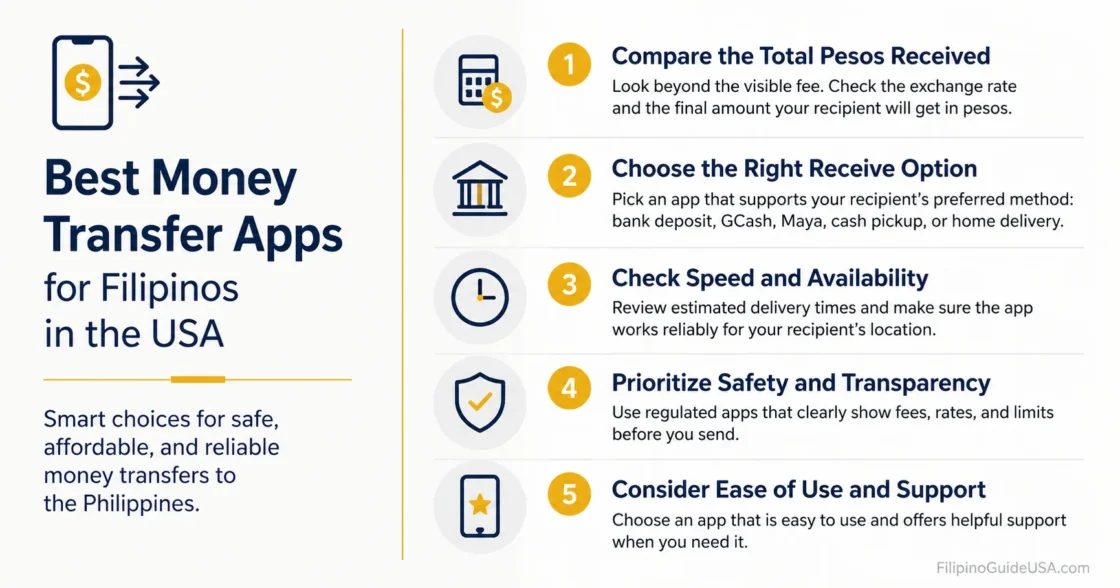
Choosing a money transfer app is not only about the lowest visible fee. For Filipino families in the United States, the better choice depends on the recipient’s location, whether the money must arrive in a Philippine bank account, GCash, Maya, cash pickup, or home delivery, and how clearly the app shows the exchange rate before payment. The safest approach is to compare the total pesos received, not only the transfer fee.
Why this matters →
Many Filipino households rely on regular remittances for family support, bills, tuition, medical needs, and emergencies, so the app must be practical, transparent, and easy for the recipient in the Philippines to use.
Reader Fit: This page is for Filipinos in the USA comparing money transfer apps for sending USD to the Philippines. It focuses on everyday family remittances, not business payments, investment transfers, or tax advice.
Information To Prepare Before Sending:
- Sender’s legal name, U.S. address, phone number, and valid identification if verification is requested.
- Recipient’s full legal name exactly as it appears on bank, wallet, or pickup ID records.
- Recipient’s Philippine bank name and account number, if sending to a bank account.
- Recipient’s GCash, Maya, or other wallet number, if sending to a mobile wallet.
- Cash pickup branch or payout network, if the recipient needs physical cash.
- Purpose of transfer, especially for larger or repeated payments.
- A screenshot or saved copy of the receipt after the transfer is submitted.
How To Choose A Money Transfer App
This section explains what matters before comparing brand names.
A money transfer app should be judged by the amount the recipient actually receives in Philippine pesos, the delivery option, the funding method, and the protections shown before payment. U.S. remittance rules generally protect consumer transfers of more than $15 sent to another country through covered remittance transfer providers, including disclosure rights before and after payment.[a]
The visible fee is only one part of the cost. A service may show a low fee but use a weaker USD-to-PHP exchange rate. The World Bank’s remittance price database is built around the cost of sending relatively small amounts from one country to another, which is the same cost problem families face when comparing apps.[b]
Tip: Before sending, compare the final “recipient gets” amount across at least two apps using the same dollar amount and the same delivery method.
Best Money Transfer Apps For Filipinos In The USA
This section compares the main app choices by real use case, not by advertising claims.
| App Or Service | Best Fit | Common Receive Options | Main Watch Point |
|---|---|---|---|
| Remitly | Families who want several Philippine delivery choices in one app. | Bank deposit, cash pickup, home delivery, and mobile money, depending on route availability. | Delivery speed and exchange rate may vary by funding method and receive method. |
| Wise | Users who care most about rate visibility and bank-style transfers. | Philippine peso transfer options shown in the Wise flow, with bank transfer often positioned as a low-cost funding method. | Not every family needs a bank-style transfer; cash pickup users may prefer another app. |
| Xoom | PayPal users who want bank deposit, wallet, cash pickup, or door-to-door options. | Bank deposit, cash pickup, mobile wallet, and door-to-door delivery in the Philippines. | Check the full cost in the Xoom screen before confirming, especially when paying by card. |
| MoneyGram | Senders who want app, online, or in-person sending with broad payout access. | Cash pickup, bank deposit, and mobile wallet. | Location-based service options and fees can differ. |
| WorldRemit | Senders comparing cash pickup, bank transfer, mobile money, and mobile load options. | Cash pickup, mobile money, bank transfer, and mobile load where available. | Limits, speed, and price depend on sender country, receive method, and payment method. |
| Ria | Recipients who prefer pickup networks or bank deposit options. | Cash pickup and bank deposit for the Philippines route. | The final rate and fee should be checked in the send flow. |
| Western Union | Recipients who need a familiar cash pickup network or mixed online and in-person options. | Online sending, app sending, in-person sending, bank account, cash pickup, and mobile wallet in select countries. | The broad network can be useful, but the total peso amount still needs comparison. |
Remitly
Remitly is often practical when the sender wants several Philippines payout choices in one place.
Remitly’s U.S.-to-Philippines page lists several delivery methods, including bank deposit, cash pickup, home delivery, and mobile money. That makes it useful when one family member wants GCash or a bank deposit while another prefers cash pickup.[c]
Remitly may be a good fit when the recipient lives far from a bank branch, uses a mobile wallet, or needs a familiar cash pickup partner. The sender should still compare the app’s exchange rate and fee for the exact amount being sent.
Wise
Wise is usually stronger for users who want clear pricing and bank-style delivery rather than cash pickup.
Wise shows USD-to-PHP transfer options for sending money to the Philippines and describes bank transfers as a low-cost funding method in its international transfer flow. It can work well when the recipient has a bank account and does not need physical cash pickup.[d]
Wise may not be the easiest choice for every household. If the recipient depends on a neighborhood pawnshop, remittance center, or cash pickup outlet, another provider may be more convenient even when the displayed rate looks better.
Xoom
Xoom can be convenient for senders who already use PayPal and want several receive methods.
Xoom, a PayPal service, lists bank deposit, cash pickup, mobile wallet, and door-to-door delivery options for the Philippines. Its Philippines page also names common banks and payout partners such as BDO, BPI, PNB, Cebuana Lhuillier, and M. Lhuillier.[e]
Xoom can be useful when the sender wants to pay from a PayPal-linked method or when the recipient needs a delivery option beyond a standard bank deposit. Before confirming, the sender should review the fee, rate, payment method, and delivery timing shown on the final screen.
MoneyGram
MoneyGram is useful when the recipient needs a known pickup network or the sender wants online, app, or location-based sending.
MoneyGram’s U.S.-to-Philippines page states that transfers can be sent online, in the app, or in person, with receiving options such as cash pickup, bank deposit, or mobile wallet. It also presents itself as a global transfer network operating across many countries and territories.[f]
MoneyGram may be suitable for recipients who are comfortable picking up cash from a nearby payout partner. It is less ideal when the sender wants the simplest app-only comparison, because cash pickup availability and pricing can depend on location and method.
WorldRemit
WorldRemit fits senders who want to compare several digital receive options for the Philippines.
WorldRemit lists cash pickup, mobile money, bank transfer, and mobile load for the Philippines route. Its own Philippines page also notes that the cheapest and fastest option depends on the sending country, receive method, and payment method.[g]
This makes WorldRemit worth checking when the recipient uses a wallet or needs cash pickup. It is also a reminder that no single app is always cheapest for every dollar amount, every province, or every payout method.
Ria
Ria is useful when cash pickup or bank deposit access is more important than a fully digital-only experience.
Ria’s U.S.-to-Philippines page says recipients can receive through cash pickup or bank deposit, with a network of locations across the Philippines. This can be useful for families who live near pickup partners or prefer a more traditional payout route.[h]
Ria may be a practical backup app for families who compare pickup availability before sending. The sender should confirm whether the recipient’s nearest location is convenient and whether the app shows the exact pesos to be received before payment.
Western Union
Western Union remains useful for families who need a wide agent network and mixed online or in-person options.
Western Union’s Philippines page lists online, app, and in-person sending, with receive options such as bank account, cash pickup, and mobile wallet in select countries. This makes it helpful when the recipient prefers cash pickup or when the sender wants the option to start online and use an agent location if needed.[i]
Western Union can be convenient, but convenience should be weighed against the final peso amount. The sender should compare the total received amount with at least one app-based provider before sending larger transfers.
Which App Is Better For Each Situation?
The right choice depends on how the recipient will receive the money.
For GCash Or Mobile Wallet Transfers
Start by comparing Remitly, Xoom, WorldRemit, and other providers that show wallet delivery for the Philippines inside the send flow. The sender should enter the exact wallet number carefully and confirm that the recipient’s name matches the wallet account.
For Bank Deposits
Compare Wise, Remitly, Xoom, Ria, MoneyGram, and WorldRemit. Bank deposit can be easier for recurring family support, rent, tuition, or savings, but the sender must verify the bank name, account number, and recipient name before payment.
For Cash Pickup
Compare Remitly, Xoom, MoneyGram, Western Union, WorldRemit, and Ria. Cash pickup may be better when the recipient does not have a bank account, needs funds in a province, or prefers a known remittance branch.
For Emergency Transfers
Choose the service that clearly shows the fastest available delivery for the chosen receive method. “Available in minutes” claims can depend on verification, funding method, partner availability, and local operating hours, so the receipt and tracking screen matter.
Warning: Do not send money to someone who pressures the sender, refuses a video or voice confirmation, changes the recipient name suddenly, or asks for secrecy. The FTC warns that once money is wired or transferred to a scammer, it is often hard to recover, and the sender should contact the transfer company immediately if fraud is suspected.[j]
Step-By-Step: How To Compare Before Sending
This simple process helps avoid choosing an app based only on the headline fee.
- Enter the same dollar amount in two or three apps. Use the exact amount intended for the transfer, such as $100, $300, or $1,000.
- Select the same receive method. Do not compare a bank deposit in one app against cash pickup in another unless the recipient accepts both.
- Check the final peso amount. The best value is usually the option where the recipient gets more pesos after the fee and exchange rate are applied.
- Review the delivery estimate. A lower-cost transfer may not be worth it if the money is needed urgently.
- Check the recipient details twice. A wrong bank account, wallet number, or pickup name can delay the transfer.
- Save the receipt. Keep the transaction number, expected availability date, and support contact information until the recipient confirms receipt.
Common Mistakes To Avoid
Most transfer problems come from details that can be checked before payment.
- Choosing the app with the lowest fee without checking the exchange rate.
- Using a credit card without reviewing whether the total cost is higher.
- Sending to a nickname instead of the recipient’s legal name.
- Choosing cash pickup without confirming the recipient’s nearest branch and valid ID.
- Sending repeated large transfers without being ready for extra verification.
- Ignoring the cancellation and error-resolution information shown on the receipt.
Practical Note: Philippine remittance needs are not all the same. A nurse in California sending monthly support to a parent’s bank account may choose differently from a seafarer’s spouse in Nevada sending urgent cash pickup to a province. The recipient’s access point matters as much as the app brand.
What To Check On The Receipt
The receipt is the sender’s main record if the transfer is delayed or incorrect.
Before closing the app, the sender should save the transfer receipt and confirm the amount sent, exchange rate, fees, taxes or other charges if shown, amount expected to be received, delivery timing, recipient name, and cancellation or error instructions. U.S. consumer protections for covered remittance transfers include the right to receive certain information and instructions for errors or complaints.[k]
If the transfer does not arrive as expected, the sender should contact the provider through the official app, website, or phone number shown on the receipt. Avoid customer service numbers sent by strangers through text, chat, or social media.
Which App Should A Filipino Sender Try First?
There is no single winner for every family, but the choice can be narrowed quickly.
- Try Wise first when the recipient has a bank account and the sender wants clear pricing for a bank-style transfer.
- Try Remitly first when the family needs a mix of bank deposit, cash pickup, mobile money, or home delivery options.
- Try Xoom first when the sender already uses PayPal and wants several Philippines receive methods.
- Try MoneyGram, Ria, or Western Union first when cash pickup access is the main concern.
- Try WorldRemit first when the sender wants to compare digital transfer routes, cash pickup, mobile money, or mobile load options.
Tip: For recurring family support, test a smaller amount first, confirm that the recipient can receive it smoothly, then use the same saved recipient profile for later transfers if the details remain correct.
FAQ
These answers address the most common questions from Filipino senders in the United States.
What Is The Best Money Transfer App From The USA To The Philippines?
The best app depends on the receive method. Wise is often worth checking for bank-style transfers, Remitly and Xoom are strong for multiple Philippines payout options, and MoneyGram, Ria, Western Union, or WorldRemit may be better when cash pickup or local payout access matters.
Is GCash Better Than A Bank Deposit?
GCash can be faster and easier for some recipients, especially for mobile-first use. A bank deposit may be better for larger household expenses, savings, or recipients who prefer a bank record. The sender should compare the final peso amount and confirm the recipient’s preferred method.
Are Money Transfer Apps Safe?
Established providers use verification and tracking systems, but safety also depends on sender behavior. Money should only be sent to people the sender knows and can verify. The sender should never rely on links or phone numbers from strangers.
Why Does The Exchange Rate Change Before Sending?
The USD-to-PHP rate can move during the day, and each provider may apply its own rate or margin. The only amount that matters is the final “recipient gets” amount shown before confirmation.
Can A Transfer Be Canceled?
Some covered remittance transfers include cancellation rights, and the provider’s receipt should explain the rules. The sender should act quickly and use the official provider channel if a mistake is found.
Should The Sender Use A Debit Card, Credit Card, Or Bank Account?
A bank account or debit card may cost less in many app flows, while credit cards can be more expensive depending on the provider and card issuer. The sender should compare the final total before payment.
Before Sending Larger Amounts
Larger transfers need extra care because verification and delays are more likely.
For larger or repeated transfers, the sender should be ready to explain the purpose of the remittance and provide identification or source-of-funds information if the provider requests it. These checks are normal in regulated money transfer services and should be handled only through the provider’s official app or website.
Important: Fees, exchange rates, delivery times, limits, payout partners, and verification rules can change. Before sending money, the sender should review the current terms inside the chosen provider’s official app or website and keep the receipt until the recipient confirms the money has arrived.
Sources
- [a] Consumer Financial Protection Bureau, “What is a remittance transfer and what are my rights?” — used for U.S. consumer protections, disclosures, cancellation, and error-rights context. The CFPB is a U.S. federal consumer finance regulator.
- [b] World Bank, “Remittance Prices Worldwide” — used for the concept that remittance cost comparison should include the cost of sending and receiving money across corridors. The World Bank is an international financial institution that tracks remittance pricing data.
- [c] Remitly, “Send money to the Philippines from the United States” — used for Remitly’s listed Philippines delivery methods. This is the provider’s official U.S.-to-Philippines corridor page.
- [d] Wise, “Send Money to Philippines” — used for Wise’s Philippines transfer route and funding-method information. This is Wise’s official transfer information page.
- [e] Xoom, “Send Money to Philippines” — used for Xoom’s listed receive options and Philippine payout examples. Xoom is a PayPal service, and this is its official Philippines send-money page.
- [f] MoneyGram, “Send Money to Philippines from United States” — used for MoneyGram’s U.S.-to-Philippines sending and receiving options. This is the provider’s official corridor page.
- [g] WorldRemit, “Send money to the Philippines” — used for WorldRemit’s receive options and note that cost and speed vary by receive method and payment method. This is the provider’s official Philippines page.
- [h] Ria Money Transfer, “Send money to the Philippines from the US” — used for Ria’s cash pickup and bank deposit options. This is Ria’s official U.S.-to-Philippines route page.
- [i] Western Union, “Send & Receive Money in the Philippines” — used for Western Union’s online, app, in-person, bank account, cash pickup, and mobile wallet information. This is Western Union’s official Philippines service page.
- [j] Federal Trade Commission, “What To Know Before You Wire Money” — used for fraud and recovery caution. The FTC is a U.S. federal consumer protection agency.
- [k] Consumer Financial Protection Bureau, “Money transfers” — used for receipt, error, and complaint-awareness context. The CFPB provides official consumer guidance on money transfer rights.